Know each student
Keep contact details, tuition start dates, subjects, tags, notes, and outstanding balances in one profile. View the details or edit just the fields that need changing.
OPEN A STUDENT PROFILE
view 1YOUR TUTORING DESK
Your students, lesson schedules, and tuition balances.
Together in one desktop app.
TuteeDex pairs quick, typed commands with a clear visual overview, so you can find a student, plan your next lesson, and keep track of what is owed.
Java 25 · Windows, macOS & Linux · Desktop CLI + GUI
EXPLORE YOUR TOOLKIT
Tools for the everyday work around your lessons.
Keep contact details, tuition start dates, subjects, tags, notes, and outstanding balances in one profile. View the details or edit just the fields that need changing.
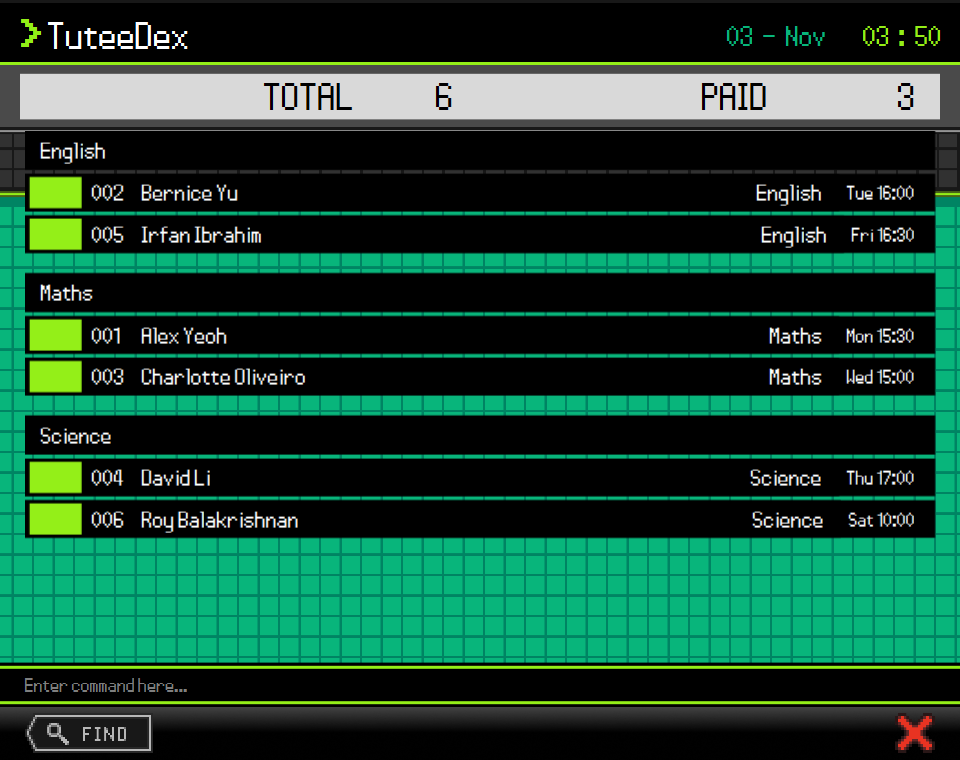
view 1Give each subject a weekly lesson day and start time. Group students by subject while keeping each student's own lesson slot visible.
sort slot/asc n/ascSearch by name, filter by subject, or bring up a tag such as needs revision.
Return to the active student list whenever you need the full picture.
list t/Needs revisionSort by upcoming lesson, name, tuition start date, or outstanding amount. Combine criteria and choose ascending or descending order for each.
sort n/ascSee outstanding tuition amounts and total/paid student counts. Archive past students without deleting their profiles, and restore them when they return.
archive 1Export profiles to CSV for a copy outside the app. Preview a CSV import before confirming it. Your student records are stored locally on your computer.
exportTHE COMMAND DESK
Type in the command box and press Enter. The student list updates in the same window; there is no need to work through a series of forms.
TuteeDex remembers your last list or find view and applied sort order when you close it, so you can pick up where you left off.
Explore the commands list t/Needs revision
sort slot/asc n/asc
view 1
Check the setup instructions for your operating system in the Quick Start guide.
Choose a JAR from the team's releases and put it in a folder where the app can save its files.
From that folder, run java -jar "TuteeDex.jar"
using your downloaded filename. Enter help to see the commands.
This site describes the current development version. Check the release notes for the features included in your download.
BUILT TOGETHER
A CS2103T team project at the National University of Singapore, built on AddressBook-Level3 by the SE-EDU initiative.
Built with Java and JavaFX, with Jackson and JUnit. Build status Coverage report